

Discord Core3.0.2

Features
- Creates a secure link between an in game player and a Discord user in your Discord server.
- This link can be accessed by any Discord Link compatible plugin.
- Add/Remove Oxide Group / Discord Role on link / unlink
Note: This plugin only performs discord link functionality and should not be loaded otherwise.
Discord Link
This plugin supports Discord Link provided by the Discord Extension.All plugins that support Discord Link can use this plugin as the discord linking plugin.
Permissions
This plugin uses the permission system. To assign a permission, use oxide.grant user or group name or steam id permission. To remove a permission, use oxide.revoke user or group name or steam id permission.- discordcore.use - Allows players to use the /dc chat command
Linking
Note:
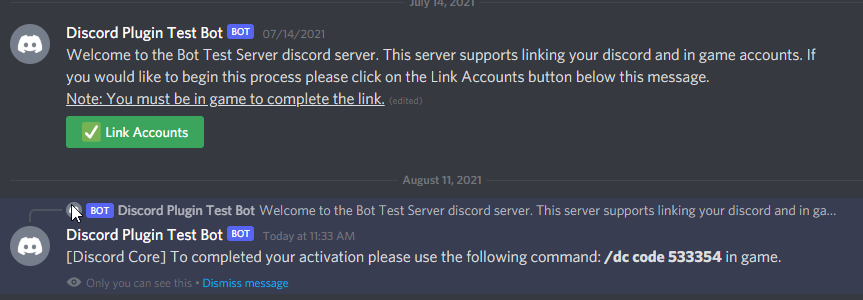
- In order for the bot to work the user who is trying to link must be in the Discord server with the Discord bot.
Starting In-Game
- Option 1: Type /dc join code in game and write the command in a private message to the bot
- Option 2: Type /dc join username#discrimiator and respond to the private message to the bot
Starting in Discord
- Option 1: Type /dc join and paste the command in game chat.
- Option 2: If enabled click on the link button in the guild channel and paste the command in game chat.
Player Commands
Game Server
/dc code - to start the link process using a code
/dc user username - to start the link process by discord username
/dc user userid - to start the link process by discord userid
/dc leave - to to to unlink yourself from discord
/dc to see this message again
Discord Server
/dc code - to start the link process using a code
/dc user - to start the link process by steam name
/dc leave - to to to unlink yourself from discord
Admin Commands
Discord Server
/dca link - admin link player game account and Discord user
/dca unlink - admin unlink player game account and Discord user
/dca search player - search by server player
/dca search user - search by Discord user
/dca unban player - unban a linked banned player
/dca unban user - unban a linked banned Discord user
Getting Your Bot Token
Click Here to learn how to get an Discord Bot Token
Configuration
The settings and options can be configured in the DiscordCore file under the config directory. The use of an editor and validator is recommended to avoid formatting issues and syntax errors.{
"Discord Bot Token": "",
"Discord Server ID (Optional if bot only in 1 guild)": "",
"Discord Server Name Override": "",
"Discord Server Invite Url": "",
"Link Settings": {
"Announcement Channel Id": "",
"Link Code Generator Characters": "123456789",
"Link Code Generator Length": 6,
"Automatically Relink A Player If They Leave And Rejoin The Discord Server": true,
"Inactive Settings": {
"Automatically Unlink Inactive Players": false,
"Player Considered Inactive After X (Days)": 90.0,
"Automatically Relink Inactive Players On Game Server Join": true
}
},
"Welcome Message Settings": {
"Enable Welcome DM Message": true,
"Send Welcome Message On Discord Server Join": false,
"Send Welcome Message On Role ID Added": [
"559471108240310292"
],
"Add Link Accounts Button In Welcome Message": true
},
"Guild Link Message Settings": {
"Enable Guild Link Message": true,
"Message Channel ID": "824633181336371250"
},
"Link Permission Settings": {
"On Link Server Permissions To Add": [],
"On Unlink Server Permissions To Remove": [],
"On Link Server Groups To Add": [
"Linked"
],
"On Unlink Server Groups To Remove": [
"Linked"
],
"On Link Discord Roles To Add": [
"759424466119032832"
],
"On Unlink Discord Roles To Remove": [
"759424466119032832"
]
},
"Link Ban Settings": {
"Enable Link Ban": true,
"Ban Announcement Channel ID": "564966011292614667",
"Ban Link After X Join Declines": 3,
"Ban Duration (Hours)": 24
},
"Discord Extension Log Level (Verbose, Debug, Info, Warning, Error, Exception, Off)": "Info"
}